
Battery Usage, Charging and StorageUpdated a month ago
Battery Usage & Care Guide
Bluetooth Applications
This battery includes a built-in Battery Management System (BMS), accessible via a mobile app, allowing you to monitor:
State of Charge (SOC)
Cell Temperatures
Individual Cell Voltages
Recommended Apps:
iPhone: ANT BMS V2
Android :ANT BMS Website
Android Direct Link: ANT BMS – APKCombo
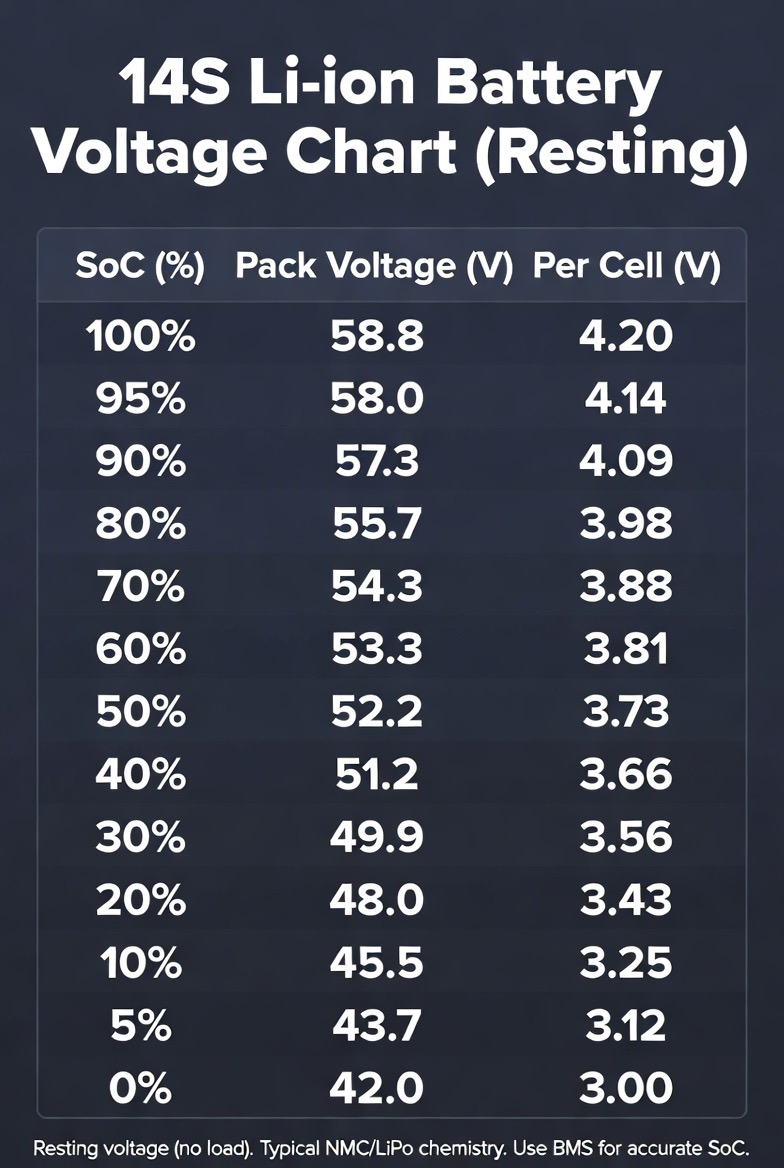
⚠️ Note: Battery percentage in the BMS app may fluctuate and be different than the remote percentage. This is normal. The percentage will change if you stop charging before full. If you need accurate percentage values mid charge it is best to look at the raw voltage values - use the below chart.
Calibrating the Battery Percentage on the Remote
You can calibrate the battery percentage displayed on the remote to improve its accuracy. This adjustment does not change the actual capacity or runtime of the battery — it simply makes the displayed percentage more precise. This is an optional setting for the tweakers.
Steps to Calibrate:
- Set Calibration to Zero. Go to Parameters 1 on the remote and set the calibration value to 0.
- Check Remote Voltage. Switch to the Debug screen on the remote. Look for the reading Bat:XX.XV (e.g. Bat:57.5V) and write down this voltage.
- Check Actual Battery Voltage Using the BMS app, connect to the battery and note the total pack voltage (e.g. 57.1V).
- Calculation
BMS Voltage - Remote Debug Voltage = Offset
57.1V - 57.5V = -0.4V
Once you have calculated the offset, put this value into the remote and save.
Charging
Charging Time: Approximately 3 hours from completely flat.
Instructions:
Insert both charging leads.
Power on the charger. The fan will start.
Press the button in on the battery to begin charging.
The light on the battery will turn ON. Older batteries this light is red. Newer batteries this light is orange. This light does not change colour.
Leave the switch on the battery On until the the battery is fully charged.
Unplug the cables by pressing the small buttons on the leads.
🔋 This battery has been destructively tested to UN38.3 safety standards. However, we highly recommend charging:
Under supervision
Away from sleeping areas
Near a smoke detector
Charging While Camping:
A common question is can i charge the battery from my caravan. In most cases the Boogie battery will be higher capacity (3000Wh) than your caravans or any portable power station. The best way to charge while off grid camping is small petrol generator, long drives or lots of solar.
An inverter to charge the battery must be:
A pure sine wave inverter
Minimum power rating: 1000W
Best suited for long drives or lots of solar due to high energy demand
A petrol generator must be:
- At least 1000W. Reports are that 800W ones have failed.
During Usage
The battery may warm slightly during operation due to internal resistance.
In the BMS app:
T1 & T2 show internal cell temperatures.
A temperature increase of ~20°C during use is normal.
Battery Longevity Tips:
Avoid activities that shorten battery life, including:
Storing fully charged or fully empty
Storing in hot environments or direct sunlight
Repeated deep-water starts with poor technique
Long-duration high-speed runs (e.g., towing or follow modes)
⚠️ If your sessions last under 1 hour, the battery has been working hard and aging faster.
Storage
Best to store between 40–60% state of charge - but do not overthink this.
Keep in a cool, dry location
Avoid direct sunlight
Cleaning
Use a mild detergent and soft cloth
Do not submerge
Powering on the Boogie
- Install the battery in Boogie.
- Plug in Battery Connectors.
- Turn On Battery.
Powering off the Boogie.
- Unplug the Battery Connectors First
- Then Turn off the Battery
If this process is not followed your battery could fail and the battery will be unusable without a costly repair. This is important.
The battery is not waterproof.
If the Boogies zip is not done up correctly and the battery gets submerged, the battery needs to be opened to inspected for water. This is a time consuming, but cheap, repair and is important for the safety of the battery.
Location specific issues.
Within a two-week period, three battery failures occurred while operating in the vicinity of a Naval Communication Station near Exmouth, Western Australia. This raises the possibility that strong external RF emissions may be inducing additional energy into the switch line of the battery causing the BMS to fail. The battery remains safe but unusable.
If you are traveling past any large military radio installations, like in Exmouth, leave the battery turned ON at all times, only turning OFF before connecting to the Boogie, then turning back on immediately.