
Remote Control GuideUpdated 18 days ago
The Boogie remote control is the result of thousands of hours of development — built to make control, navigation, and safety as intuitive and reliable as possible.
The Remote needs to be turned on for 5+ minutes before getting on the water to gain accurate GPS reception. If the remote does not have GPS reception Follow and Summon will not work.
🔧 Basic Operation
Unlocking the Remote:
Press the center button
Pull the trigger within 5 seconds
→ Remote remains unlocked for ~10 seconds before automatically re-locking.If the remote does not unlock then go into the menu and re-calibrate the trigger. The remote will not unlock if the throttle is not at zero which can happen if the calibration is out, or there is sand stuck in the trigger.
Accessing the Menu:
Hold both Left and Right buttons to open the menu.
Menu includes:
Pairing to Boogie
Trigger calibration - follow instructions on the screen.
Profile settings
Firmware updates
Remote Magnet Reset in case of freeze:
Locate the magnet symbol above the screen on the remote.
Hold this part of the remote against:
A strong magnet, or
The side of the Boogie's motor (the part underwater that the propellor connects to with the zerotow logo)
The V3 Boogie motor no longer works for a magnet reset. All new V3 Boogies have this magnet installed in the rear inflation valve.
✅ Test this reset feature before needing it.
⚠️ Important Notes:
The remote does not float – use a leash or float accessory.
Charge time: ~4-8 hours depending on wall adapter and cable used.
Charge the remote somewhere cool, not in direct sun, not in a hot car.
Run time: ~4 hours
🔋 Charging Instructions
Place the handle on the charging disc. Charge time: ~4-8 hours.
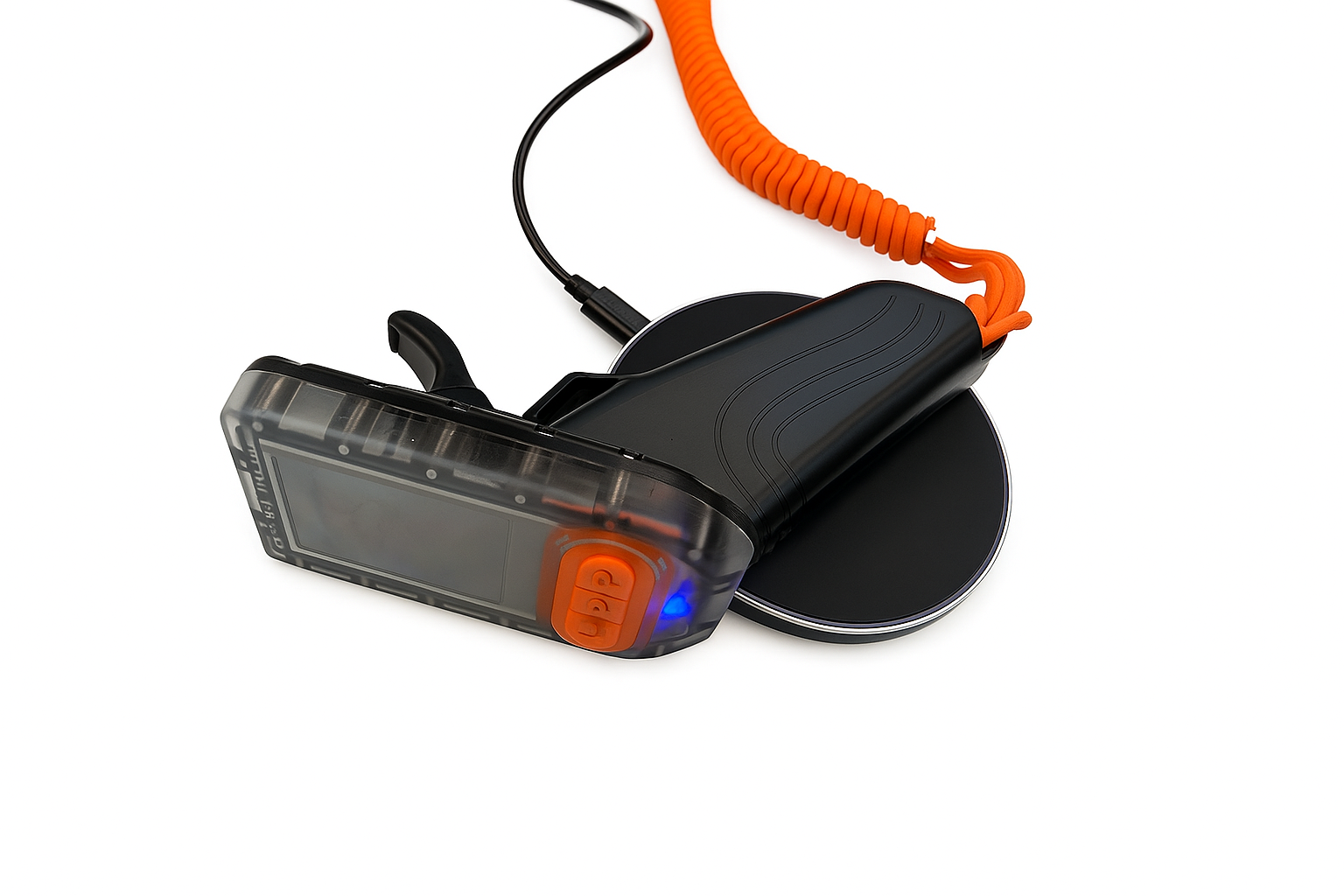
Look for the bright blue LED on the remote to confirm charging position.
If the blue light is flickering, the handle is misaligned and may overheat and damage the charging circuit.
Match the charging symbol on the handle with the disc for correct orientation.
💡 Indicator Light Guide
| LED Color | Meaning |
|---|---|
| 🔴 Solid Red | Poor GPS signal accuracy — wait for better fix (usually 2–5 mins on land). |
| 🟠 Solid Orange | Boogie battery level is below 20%. |
| 🟢 Solid Green | Auto Follow Mode is active. |
| 🟢 Flashing Green | Summon Mode is active. |
| 🔵 Solid Blue | Cruise Control is active. |
| 🔵 Solid Blue | Remote is in Wi-Fi / firmware update mode (same light as above). |
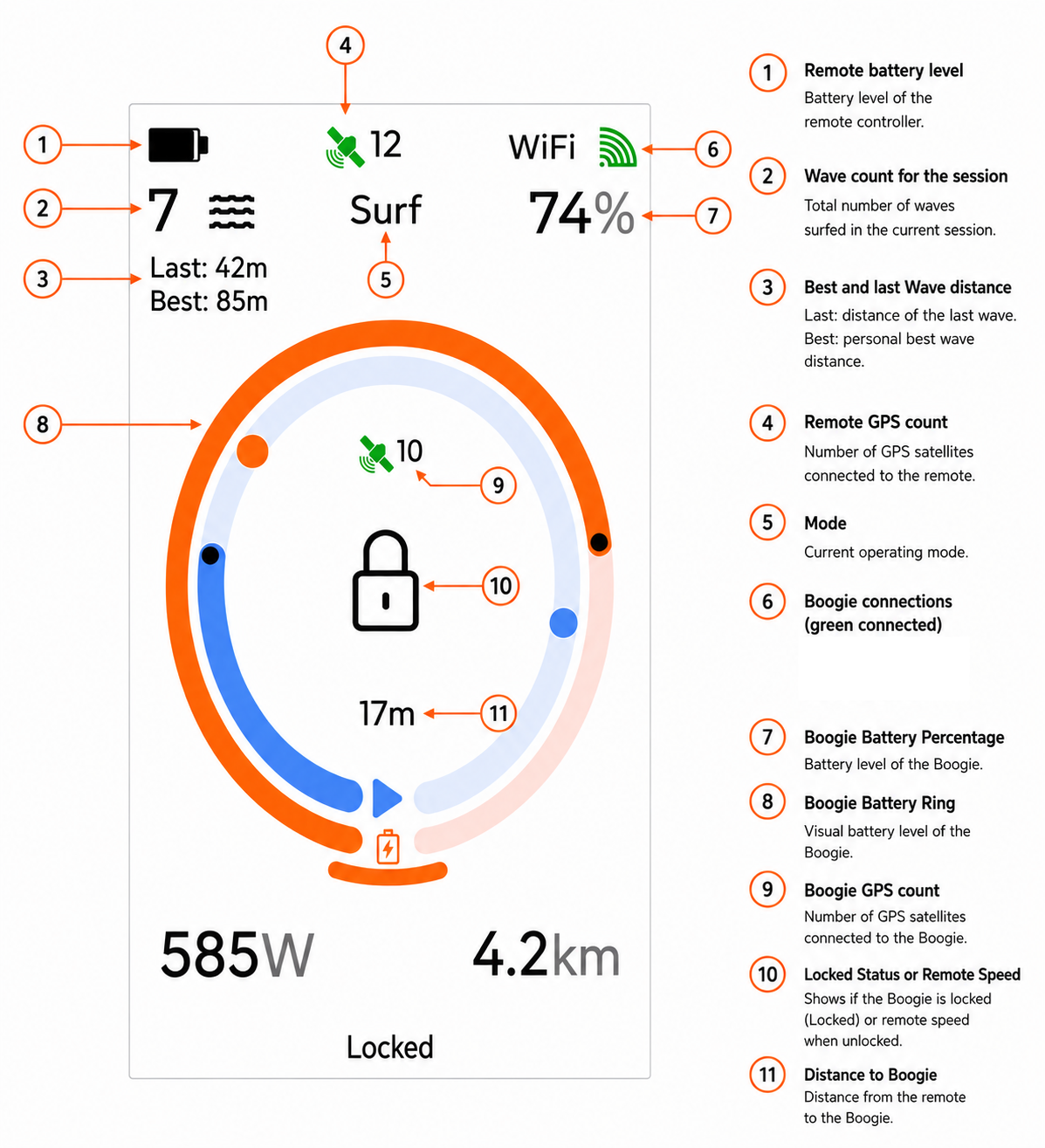
Boogie Remote & Autonomy Guide
🚀 Manual Driving
Steering: Use the Left and Right buttons on the remote to steer manually.
Range: ~150 meters. Holding the remote high and with an open hand significantly improves range.
🤖 Follow and Summon Modes Overview
Follow and Summon steering puts safety first:
Throttle is always controlled by the remote.
Steering is handled automatically.
If the remote goes underwater or is more than 150m away, the Boogie immediately stops.
⚠️ Never use auto modes within 200m of other water users.
Unsafe use will result in warranty limitations and denial of spare part sales. Do not ruin this for everyone, risk a fine, or confiscation of your Boogie by authorities. There is no excuse for using the Boogie around other water users.
🔄 Follow Mode
Used when on a wave, behind a boat wake, or pumping in flat water.
Activation Method:
Triggers when:
Remote and Boogie have high quality GPS signal (turn on 3–5 mins before water entry)
Remote speed > 20 kph
Distance to Boogie > Auto Follow Trigger Distance (default 15m)
Throttle is at zero
In Practice
Catch a wave or pump away.
Release the throttle.
Wait for the remote to vibrate.
Confirm solid green LED before pulling the trigger.
Boogie follows you at ~25m distance.
Releasing the trigger stops the Boogie immediately.
✅ Always visually confirm the Boogie is following before continuing down the wave.
↔️ Left/Right and Follow-in-front Offset
The Boogie can be set to follow back left or right, or to the front left or right. This is useful to keep the Boogie away from the peak, white wash or away from rocks. The offset is stored and shown as an orange segment on the outside of the battery gauge. This is the position relative to the rider that the Boogie will aim for.
To Change the Offset: Hold the Left or Right button, then press the Center button
Works whether the remote is locked or unlocked
Optional: 1-Click Offset can be enabled in Profiles
If enabled, offset changes work as follows
Locked: Clicking Left or Right changes the offset
Unlocked: Hold Left or Right, then click Center
Towing or Auto Mode: Clicking Left or Right changes the offset
Follow distances can be changed in parameters, but the default settings of 25 meters work well.
🧲 Summon Mode
Brings the Boogie back to you (from shore or in water).
Auto Activation: When you come off foil after Follow.
Manual Activation: Press the center button when stationary.
Boogie steers directly toward you with flashing green LED.
Summon disables within 10m and reverts to manual control.
For safety, the first pull of the trigger after summon will restrict the speed to to 20%. "Restricted" will show at the bottom of the screen. To get back to full manual control the trigger needs to be released to 0.
The Boogie slows down as it approaches you, but you should always also limit the throttle.
When in summon, the letter in the center of the screen is the direction from you that the Boogie is in.
N means the Boogie is to the North of you
S means the Boogie is to the South of you
E means the Boogie is to the East of you
W means the Boogie is to the West of you
💡 Notes on Autonomy
GPS signals + lots math = magic, but it's not always perfect. You are always in control of the throttle.
GPS quality may degrade:
In bad weather
After prolonged remote submersion
A red LED = poor GPS.
Boogie follows a straight path — there is no obstacle avoidance.
Follow and Summon modes require a reliable 2.4 GHz link to function.
🛳 Cruise Control
Maintains speed while you foil.
Enabling:
Make sure Cruise Control is enabled in Profiles.
While foiling, press center button.
Remote vibrates, solid blue LED confirms activation.
Pull throttle above the Cruise Control setpoint.
Use Left/Right buttons to fine-tune speed (±5%).
Disabling:
Reduce throttle below setpoint, or
Press center button (⚠️ Caution: may jump to 100% throttle if trigger is still fully pressed).
Activation Criteria:
Remote speed > 10 kph
Throttle > 10%
Good GPS signal
📍 Position Hold
Keeps Boogie in place — ideal for gear changes or having lunch.
Features:
Activated via menu, or triple center button press - enabled in Parameters 2
Slowly circles around the GPS coordinates at activation
Remote can be turned off while in this mode
Runs up to 100 hours on full battery
🛰 Ensure GPS antenna (black square on actuator) is unobstructed.
🚨 Emergency Summon
Multi click Position Hold and Emergency Summon is enabled in Parameters 2
Activation: Press the center button 5 times to trigger Emergency Summon.
Function: The remote sends its location to the Boogie, once received the Boogie will idle to that location—even if the remote goes out of range, behind a wave, or underwater.
The remote position at activation is used, future firmware will update this position so the Boogie will go to the latests updated GPS position.
The remote will fast flash the blue and red LED the when sending position data to the Boogie, and then slow flash once per second once the data has been received.
3 click Position Hold and Emergency Summon is enabled in Parameters 2
Safety Notes:
Only for use in emergencies.
Ensure you have visual contact with the Boogie.
Make sure there is no one in the water around you.
Does not work in geofenced areas.
It can take up to 10 seconds to enable after the remote has been submerged.
Sends signal every 500ms.
You need to have at least 10 GPS satellites on the Boogie and Remote.
Deactivation: Any button press or throttle input will cancel Emergency Summon and go into normal Summon.
Speed Control: Emergency Summon speed is set via PosHold Max Speed. Recommended setting: 18. This will need to be changed in settings to stop the Boogie fishtailing due to low speed.
🐌 Idle Start
Double-click the center button while unlocked, and the Boogie will idle at 15% throttle for 15 seconds—making deep water starts much easier as the rope remains tight.
Note: The remote must be above water, though we’re working on making it submersible-compatible. The Idle throttle level can be changed in Parameters up to a maximum of 30%.
Enable this feature in Profiles.
👥 Profiles
Adjust for rider or conditions:
| Setting | Default |
|---|---|
| Throttle Ramp Up Time | 1200 ms |
| Throttle Ramp Down Time | 500 ms |
| Max Power (%) | 80% |
| Remote Relock Time | 10 seconds |
| AutoFollow Trigger Distance | 15m |
🔋 Calibrating the Battery Percentage on the Remote
You can calibrate the battery percentage displayed on the remote to improve its accuracy. This adjustment does not change the actual capacity or runtime of the battery — it simply makes the displayed percentage more precise. This is an optional setting.
Steps to Calibrate:
- Set Calibration to Zero. Go to Parameters 1 on the remote and set the calibration value to 0.
- Check Remote Voltage. Switch to the Debug screen on the remote. Look for the reading Bat:XX.XV (e.g. Bat:57.5V) and write down this voltage.
- Check Actual Battery Voltage Using the BMS app, connect to the battery and note the total pack voltage (e.g. 57.1V).
- Calculation
BMS Voltage - Remote Debug Voltage = Offset
57.1V - 57.5V = -0.4V
Once you have calculated the offset, put this value into the remote and save.
🚀 Launch Control:
This firmware has a new feature called Launch Control which will adjust the motor during takeoffs and deepwater starts to prevent the Boogie rolling and cavitating due to prop torque. Once on foil the motor will automatically straighten out so towing is normal and you don't need to be out one side.
In the past you had to adjust the "Manual rudder offset" to somewhere in between where you could do a deep water start, and where it would still tow mostly straight but it was a compromise. This feature will allows you to tune the Boogie to have the best of both worlds.
How it works:
There is a new parameter in Settings > Parameters 2 > Rudder Launch Offset
The default is 15%. If you change the value to 0% then there will be no change.
When starting, the motor will automatically move to the Launch position, and then once on foil (above 20kph) the motor will straighten to the default position.
If you have changed the "manual rudder offset" previously to aid in deep water starts, you can reduce this value so that when towing behind the Boogie you are straight out the back.
Warning:
This feature allows more power to be put through the Boogies motor and could lead to a burnt out motor if you don't get on foil quickly during a deep water start especially if you are heavier and using a small board. There is no change to the power output of the motor.
⚙ Parameters
Advanced tuning for autonomous behavior:
| Parameter | Notes | |
|---|---|---|
| Auto Follow Offset | 25 m | Left/right follow distance |
| Auto Rudder Limit Left/Right | 100% | Compensates for torque-induced turn bias |
| Auto Rudder P Gain | 20 | Higher = more aggressive turning. |
| Auto Turn Error Ramp | 60° | Turn slows as Boogie faces away from you |
| Manual Rudder Offset | 0% | Adjust 5–10% if Boogie pulls left/right |
| Manual Rudder Position | 90% | Max rudder throw when steering manually |
| Manual Rudder Speed Limit | 20% | Max speed before allowing tight turns |
| Battery Calibration | 0 | Details above |
| Course Average Time | 5 sec | Smooths direction when carving on a wave |
Adjusting the Boogie's Steering Center Position
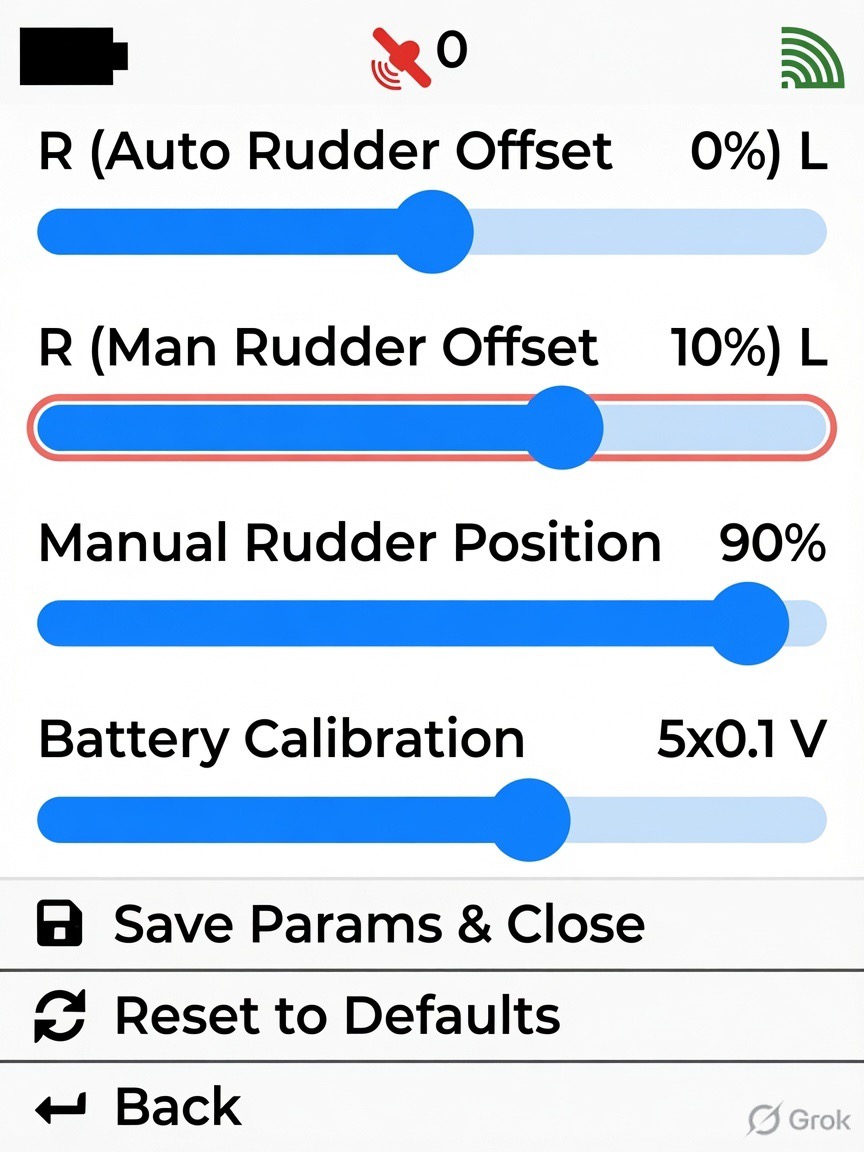
The Boogie's steering center position can be adjusted using the Manual Rudder Position setting in Parameter 1 on the remote.
The default setting of 0% works well for most riders. However, depending on whether you ride natural or goofy, you may prefer to fine-tune the steering center for a more comfortable towing position.
If the Boogie pulls to the right and you need to position your foil to the right of the Boogie to travel in a straight line, add a left offset using the Manual Rudder Position setting, as shown in the image below.
Adding a left offset causes the motor to point slightly further to the left while towing, helping the Boogie track straight infront of you.
A +10% adjustment is a good starting point. Test the steering and continue making small adjustments until the Boogie tracks straight in your preferred riding position.
If the Boogie pulls to the left and you need to position your foil to the left of the Boogie to travel in a straight line, add a right offset using the Manual Rudder Position setting, as shown in the image below.
Adding a right offset causes the motor to point slightly further to the right while towing, helping the Boogie track straight infront of you.
A -10% adjustment is a good starting point. Test the steering and continue making small adjustments until the Boogie tracks straight in your preferred riding position.
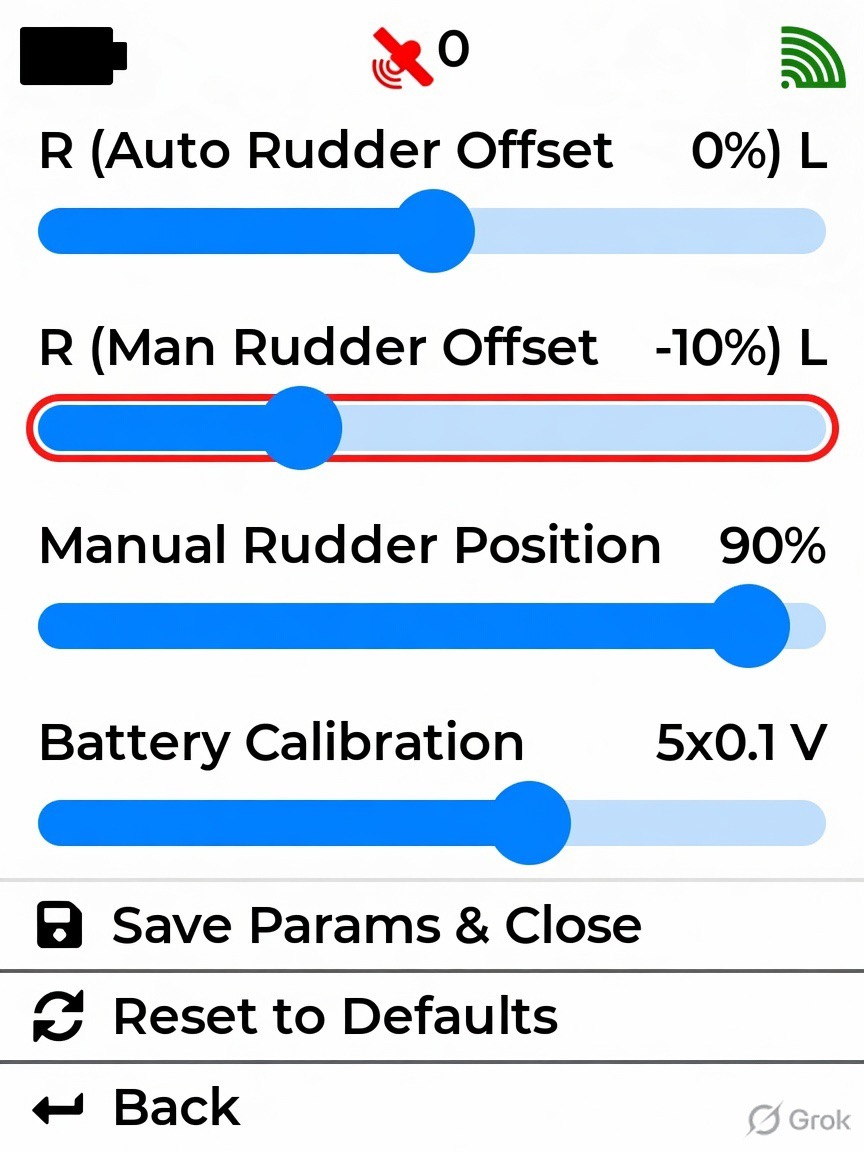
Most riders prefer a small left offset, as it helps counteract propeller torque during starts and improves tracking in rough water. Too much right offset will cause the Boogie to roll over during whips into waves, or when bouncing in rough water due to the prop torque.
Tuning the Auto Rudder Offset.
The Boogie usually bias the left side when in Follow and Summon due to prop torque. This can be compensated for by tuning the Auto Rudder Offset position. To do this follow these steps.
- Drive the Boogie away from you in manual, if the Boogie arcs to the left, then add some right Manual Rudder Offset. Do this until the Boogie drives in a straight line. Between -5% and -10% should be enough to make it drive straight.
- Copy this value to the Auto Rudder offset Parameter.
- Set the manual rudder offset back to your preference.
- Save while in range of the Boogie.
- Restart the Boogie (just to be sure)
Steering Calibration on Start up
Each time the Boogie is powered on, the steering system performs an automatic calibration. Ensure the steering can move freely through its full range of motion during this process.
If the steering is blocked by the trolley, the ground, or any other obstacle, the calibration will be incorrect and the steering may not track properly.
If this happens, and you are already in the water, you can re-calibrate the steering by rebooting the Boogie from the remote. Navigate to Firmware Update on the remote and select Reboot Boogie. Once the Boogie restarts, the steering will be calibrated correctly.
Safe Mode/ Full Remote Reset.
The remote has a special safe mode which allows firmware installation without fully turning on the remote incase of an unstable firmware. This mode will also erase all settings and parameters in case any of these settings were causing the issues.
Going into Safe Mode to load a new firmware:
- With the remote OFF, hold the left and right buttons down and press the center button as if you were turning on the remote.
- The screen will not turn on.
- The LED on the remote will flash green. If the light is not flashing green then you are not in safe mode - try again.
- The remote will automatically make a wifi access point called "zerotow-remote-safe"
- Connect to this can you can upload the new firmware http://192.168.4.1
- If needed going to http://192.168.4.1/info will display extra information.
- You can restart the remote by pressing the left or right buttons
- Safe Mode does not erase the current firmware
Going into Safe Mode fix a firmware bug:
- Hold the left and right buttons down then hold the center button as if you were turning on the remote.
- The screen will not turn on
- The LED on the remote will flash green
- After a few seconds press any button restart the remote
- Safe Mode does not erase the current firmware
Going into Safe Mode will reset all settings back to factory.
- You will need to re pair the remote to the Boogie.
- You will need to re do the trigger calibration.
- The remote will not unlock or work unless the calibration and re pairing is done,