
Follow and Summon TroubleshootingUpdated 19 days ago
We are always trying to improve the Boogie and Remotes code to make the experience as good as possible. Most Follow and Summon issues can be resolved by:
- Reading and understanding the remote instructions here.
- For V1 and V2 Boogies make sure the steering arm is tight and secure by following this guide.
- Making sure the hull is pumped up to 10PSI, and the the shell (under the zip) is pumped up to the minimum amount to prevent nose dives in chop.
- Updating to the latest firmware on both the Remote and Boogie using the instructions found here.
- Ensure the remote has got good GPS reception. Turn the remote on for 5 minutes + before getting in the water. The remote GPS quality is the number in the top center of the screen. This number should be above 12 and green.
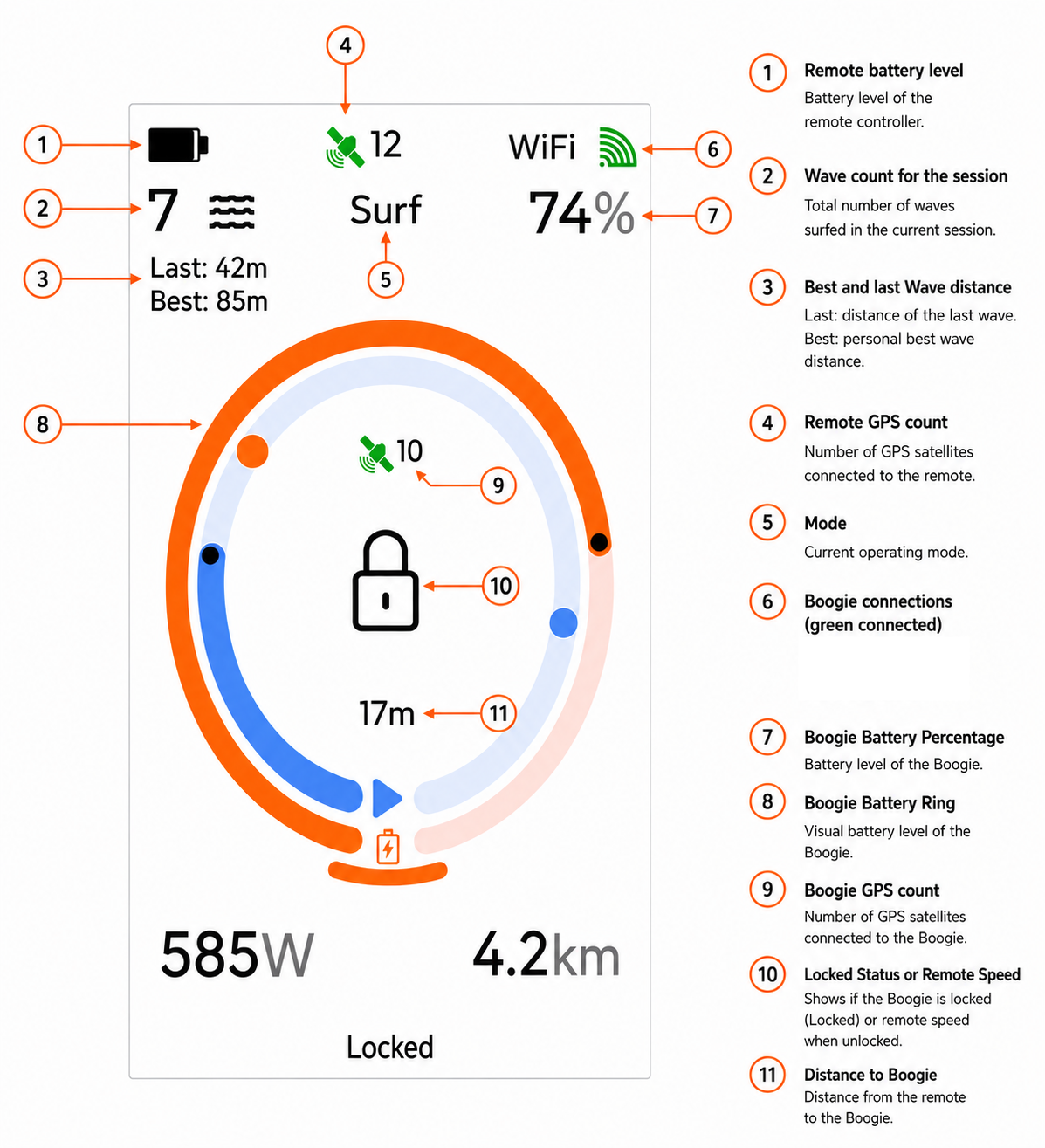
- Go back to default settings. Reset all settings the Remote settings and parameters to defaults. All of the Boogie settings are saved in the Remote, To be extra sure that the remote is completely erased you can do a "Safe Mode Reset". This will factory reset the remote and all settings and data will be erased.
- If you have made changes to parameters on the remote during a sessions restart the Boogie to ensure all parameters have been transferred across.
- Tune the Auto Rudder Offset so that the Boogie follows more accurately.
- Check that the GPS antenna is still mounted correctly and has not fallen behind the control case. On V1 and V2 Boogies the GPS antenna is mounted on top of the Actuator. On V3 it is mounted directly to the control case. The GPS antenna is the small black plastic box.
- Ensure the Boogie has good GPS reception. This is in the center of the screen and should read 12 exactly.
- Make sure the remote is unlocked. Once you are experienced and confident you can extend out the relock time to 30 seconds.
- Make sure the Boogie is in Range:
- Hold the remote above your head with an open grip if the Boogie is a long way away. The antenna in the remote is below the trigger so it is important to get maximum range that your wet hand is not blocking the signal.
- Ensure the antenna in the Boogie is vertical during inflation.
- Reduce the Auto Follow trigger distance so that the Auto mode is triggers quicker when whipping onto a wave so the boogie is always closer to you.
- When whipping onto a wave, ensure the Boogie is pointing in the direction of travel so that it doesn't waste time turning.
- If it is rough conditions ensure the battery is installed towards the control box with some foam or the remote case in front of the battery. Increase the pressure in the shell which will help reduces the chances of the Boogie nose diving.
- Ensure that you are in Follow mode. The bright green LED is on.
- If an error occurs while in Summon, make sure you are in Summon and the green LED is flashing.
If you are still experiencing issues please sign up to the Boogie Sessions app and upload logs.
Follow these instructions to upload logs
Let us know your user name and the exact time you had the issues along with a description.